
WhatsApp Coexistence for Sales Teams: How to Get the Most Out of It
Employees keep using their phone number in the WhatsApp Business app, while the API works in the background to sync and automate.



Integrate your CRM with other tools
Lorem ipsum dolor sit amet, consectetur adipiscing elit lobortis arcu enim urna adipiscing praesent velit viverra sit semper lorem eu cursus vel hendrerit elementum morbi curabitur etiam nibh justo, lorem aliquet donec sed sit mi dignissim at ante massa mattis.
- Neque sodales ut etiam sit amet nisl purus non tellus orci ac auctor
- Adipiscing elit ut aliquam purus sit amet viverra suspendisse potenti
- Mauris commodo quis imperdiet massa tincidunt nunc pulvinar
- Adipiscing elit ut aliquam purus sit amet viverra suspendisse potenti
How to connect your integrations to your CRM platform?
Vitae congue eu consequat ac felis placerat vestibulum lectus mauris ultrices cursus sit amet dictum sit amet justo donec enim diam porttitor lacus luctus accumsan tortor posuere praesent tristique magna sit amet purus gravida quis blandit turpis.

Techbit is the next-gen CRM platform designed for modern sales teams
At risus viverra adipiscing at in tellus integer feugiat nisl pretium fusce id velit ut tortor sagittis orci a scelerisque purus semper eget at lectus urna duis convallis. porta nibh venenatis cras sed felis eget neque laoreet suspendisse interdum consectetur libero id faucibus nisl donec pretium vulputate sapien nec sagittis aliquam nunc lobortis mattis aliquam faucibus purus in.
- Neque sodales ut etiam sit amet nisl purus non tellus orci ac auctor
- Adipiscing elit ut aliquam purus sit amet viverra suspendisse potenti venenatis
- Mauris commodo quis imperdiet massa at in tincidunt nunc pulvinar
- Adipiscing elit ut aliquam purus sit amet viverra suspendisse potenti consectetur
Why using the right CRM can make your team close more sales?
Nisi quis eleifend quam adipiscing vitae aliquet bibendum enim facilisis gravida neque. Velit euismod in pellentesque massa placerat volutpat lacus laoreet non curabitur gravida odio aenean sed adipiscing diam donec adipiscing tristique risus. amet est placerat.
“Nisi quis eleifend quam adipiscing vitae aliquet bibendum enim facilisis gravida neque velit euismod in pellentesque massa placerat.”
What other features would you like to see in our product?
Eget lorem dolor sed viverra ipsum nunc aliquet bibendum felis donec et odio pellentesque diam volutpat commodo sed egestas aliquam sem fringilla ut morbi tincidunt augue interdum velit euismod eu tincidunt tortor aliquam nulla facilisi aenean sed adipiscing diam donec adipiscing ut lectus arcu bibendum at varius vel pharetra nibh venenatis cras sed felis eget.
We recently launched a new visibility feature for sales leaders called WhatsApp coexistence, see previous post here. This complements our market-leading group chats visibility features, to make Coral the only vendor on the market that gives visibility into both group chats and direct chats through official WhatsApp functionality - book a demo with us to learn more.
If you are a Head of Sales or Rev Ops, here's what coexistence is, what it changes day to day, and how to think about turning it on.
What is coexistence?
Coexistence connects your existing WhatsApp Business app account to a WhatsApp-approved vendor through a guided linking flow. Once it's on, the app and the API share the same number, the same conversations, and the same contact list. There's no number swap, no downtime, and no need to retrain your team on a new mobile app. Your phone-based team keeps using the WhatsApp Business app that is easy, familiar, and free. And your platform - Coral, in this case - handles automations, reporting, and CRM sync in the background.
Picture a sales team with 40 sellers. Each rep is issued a dedicated company phone number, downloads the WhatsApp Business App, and connects that number, keeping their personal WhatsApp fully separate from the employer's. What's new is that Coral can onboard all 40 of those numbers to your Coral account, give you API capability on each one, and push every message into your CRM. That's a serious step-change in capability for a sales leader.
The result is a hybrid setup: people where people make sense, software where software makes sense.
Five things coexistence changes for your business
1. Conversations are synced and visible in your CRM
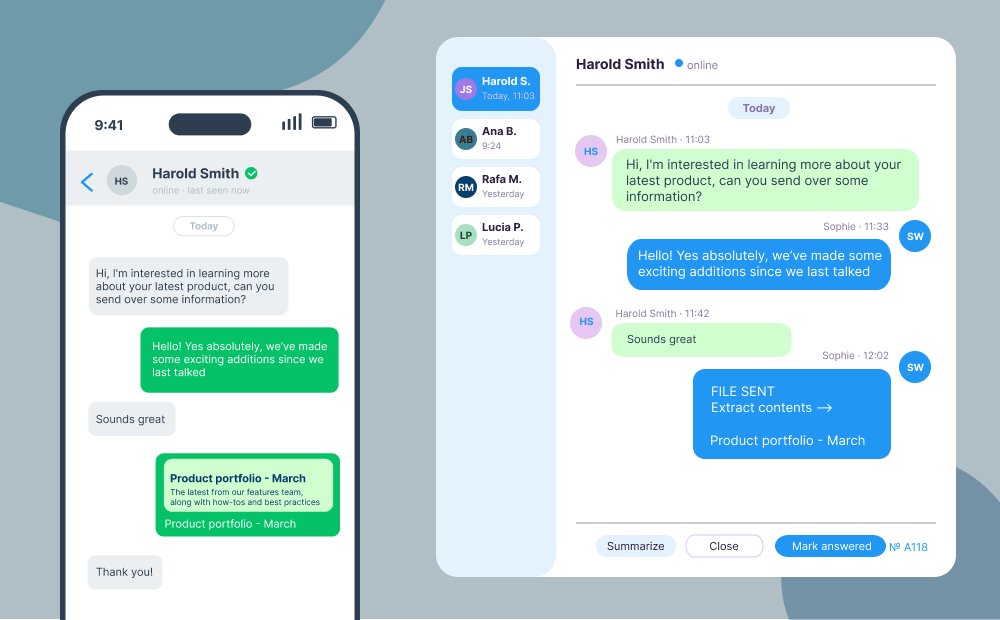
A customer can message an employee, and the full conversation shows up in the employee's WhatsApp Business app and in Coral's systems and in your CRM. Replies sent from the employee from their phone and replies sent from your Cloud API both appear in your Coral account and in the WhatsApp Business app chat thread. You stop losing context every time a client moves between channels, and your CRM finally sees the whole picture. And your employees no longer need to manually enter client conversation details into your CRM, since Coral will now do this for them automatically. When the account changes owners or progresses to a new team, the full thread is right there for whoever picks up the account, typically account management or customer success teams.
2. Messages sent from the employee are always free
Messages sent from the WhatsApp Business app are free. Messages and templates sent from the Cloud API are billed by WhatsApp at regular rates. Coexistence lets you choose the right persona for the job: keep one-to-one customer chats on the app where they cost nothing, and run broadcasts, reminders, and template-based campaigns through the API where the scale is worth the spend.
3. New leads are captured and synced, automatically
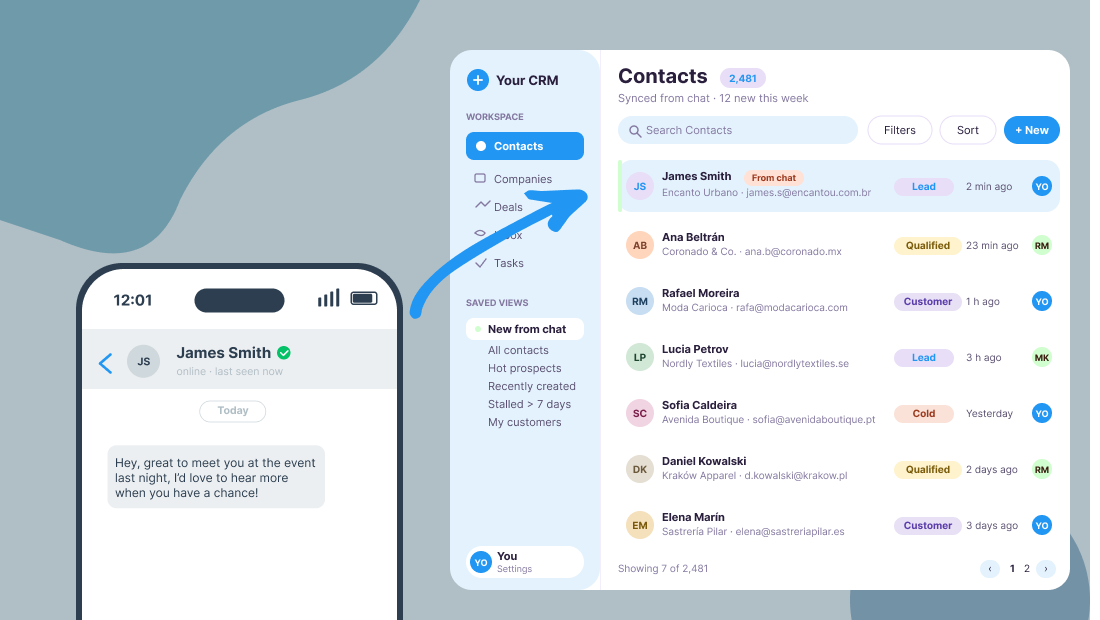
When a new contact reaches your number, you don't have to copy details into the CRM by hand. Coexistence pushes new leads into both the Business app contact list and your connected platform at the same time. Less duplicate data entry, fewer missed follow-ups. Coral can also layer in custom lead qualification bots or welcome bots, depending on what your team needs.
4. Mix a human touch with automation
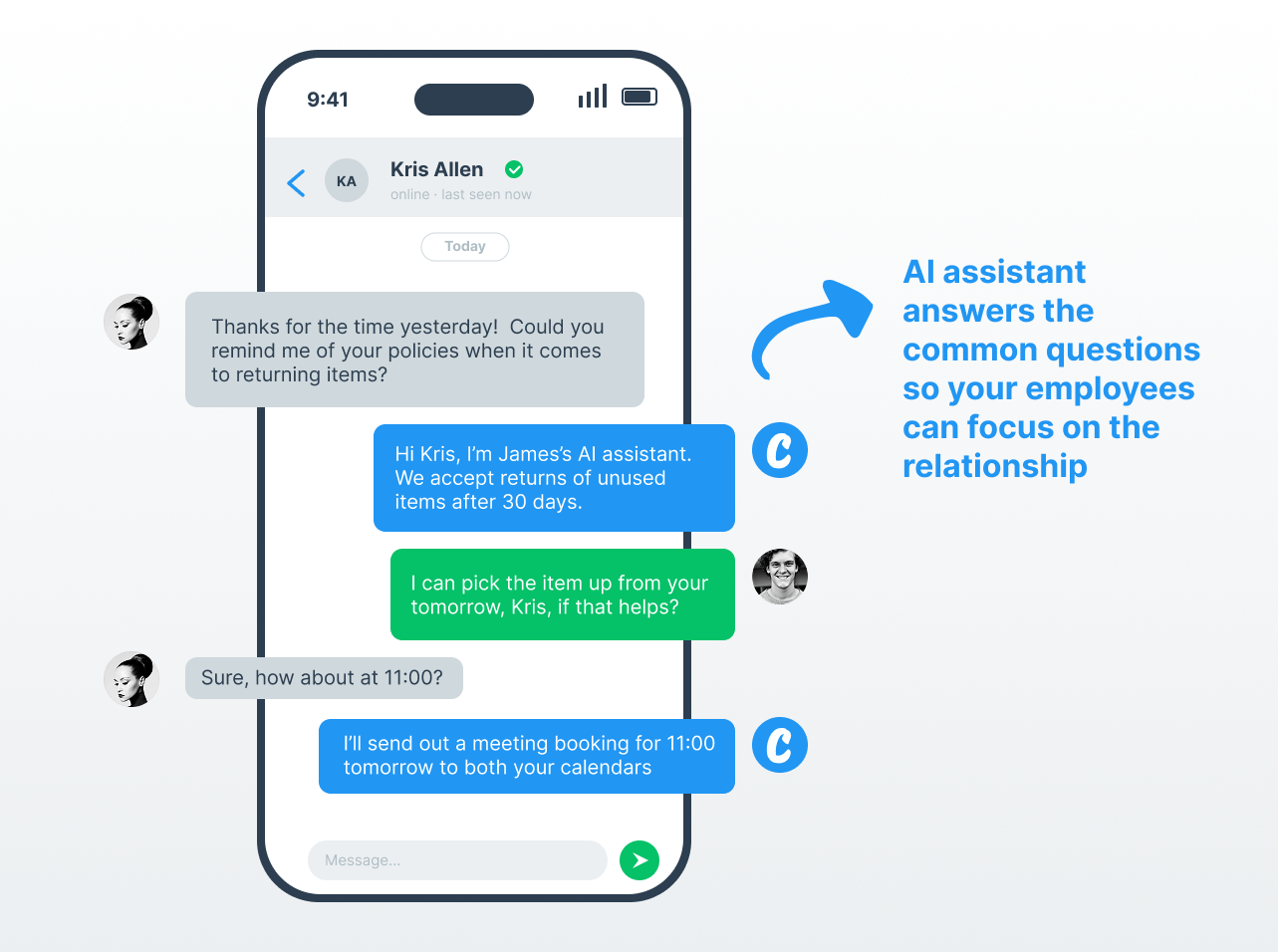
Coexistence is what makes a true hybrid workflow possible. You can run an auto-reply outside business hours, a chatbot for routine questions, and send messages in bulk into many chats, all without forcing your team off the WhatsApp Business app they prefer. Coral handles the automation side, your team handles the conversations that need a person, and customers get the best of both worlds.
5. Up to six months of past chats come along
When you turn coexistence on, you can pull in up to six months of prior conversation history from the Business app into your Coral account and your CRM. Your team isn't staring at a blank slate. Past negotiations, shared files, and customer context are there when you need them, which makes the switch much easier on the people who handle accounts day to day.
What to know before you turn it on
Coexistence is straightforward, but a few details are worth checking before you flip the switch:
- A handful of features behave differently in coexistence mode. Catalog editing, payments, and certain admin actions may need to live in one place rather than both. Check the current support matrix here.
- The history import covers up to six months, not the full lifetime of the account. Older messages stay on the device they were sent from.
- You're limited to adding 50 phone numbers with coexistence to your Coral account (most vendors limit each client to 20 numbers, but Coral's limit is 50).
- Only direct chats can be synced, not group chats. However, Coral has a complementary solution for automation and visibility of group chats, speak to the Coral team to learn more.
How to get started
Most setups with Coral take less than 5 minutes. The hardest part is usually deciding which workflows to automate first, not the technical wiring. You can find instructions on how to set up a number with coexistence, once you already have a Coral account, here.
A practical way to think about it
Coexistence isn't about replacing your team with bots, and it isn't about forcing everyone into a new tool. It's about removing the trade-off between manual and automated, and letting both run on the channel your employees and customers already prefer.
If your employees are on the WhatsApp Business app today and you've been waiting for a less disruptive way to add automation, reporting, and CRM sync, this is it. Connect your number to Coral, keep your team where they're comfortable, and let the API do the work that doesn't need a person.
.png)
.png)

No. Coexistence is designed to be non-disruptive. Your team keeps using the WhatsApp Business app they already know, with no number changes and no downtime. Coral works in the background to handle automations, CRM sync, and reporting — your reps won't notice a difference in their day-to-day workflow.
Up to six months of past chat history from the WhatsApp Business app is automatically imported into your Coral account and CRM. This means your team has full context on past negotiations, shared files, and customer interactions from day one — no blank slate, no lost history.
Not for most clients. Messages sent directly from the WhatsApp Business app remain free. API-based messages — such as bulk broadcasts, reminders, and template campaigns — are billed at standard rates. Coexistence lets you choose which channel to use for each scenario, so you can keep one-to-one customer conversations free while reserving the API for higher-volume activities where the scale justifies the cost.
You can connect up to 50 phone numbers to your Coral account under coexistence — well above the 20-number limit offered by most vendors. And, only direct chats can be synced (not group chats, though Coral has a separate solution for those).